FEW YEARS AGO

Thursday, November 22, 2012

How to Quickly Resize Multiple Photos in Mac OS X Using a Terminal Command


If you use a Mac and regularly need to resize batches of photos, there’s actually a tool built into your operating system that lets you do just that without having to open any image editing program. It’s called “sips”, which stands for scriptable image processing system. It’s extremely easy to use, but you’ll need to know how to use Terminal to take advantage of it.

Simply put copies of all the photos you’d like to resize into a directory, navigate to that directory within Terminal, and run the command:
sips -Z PIXELS *.EXTENSION
Where PIXELS is the maximum number of pixels you’d like the width or height to be, and EXTENSION is the file type you’re working with (e.g. jpg, png, gif).
For example, if you’d like to shrink a large batch of JPEG images down to 620px in width/height, you would run the following command in Terminal (assuming the present working directory contains the files):
sips -Z 620 *.jpg
That’s it. The tool quickly resizes all the images in the directory down. Be aware that this overwrites the original files, so you’ll want to make sure you’re only doing this to copies of photos, not the originals themselves.
To save time, there’s way way to easily open up Terminal in the directory containing the photos you’d like to resize. It’s a right click option that you’ll need to enable: go to System Preferences->Keyboard->Keyboard Shortcuts->Services->Files and Folders and making sure New Terminal at Folder is checked.
How to Quickly Resize Multiple Photos in Mac OS X Using a Terminal Command step11
Do this, and you’ll see an option for “New Terminal at Folder” when you right click the folder containing your images:
How to Quickly Resize Multiple Photos in Mac OS X Using a Terminal Command rightclick
sips can do much more than the simple batch resizing outlined in this post. Check out the command’s manual for all the different functions and options you can use to edit photo files from the comfort of command line (e.g. cropping, editing the color profile, padding, flipping, rotating, etc…).
(via Lifehacker via MacLife)

Read more at http://www.petapixel.com/2012/11/21/how-to-quickly-resize-multiple-photos-on-a-mac-using-a-terminal-command/#GbTRg1CVd0l0lRSq.99 

Tuesday, November 13, 2012

American Tintype: A Portrait of a Tintype Portrait Photographer


Documentary filmmaker and photography enthusiast Matt Morris recently noticed a magazine article about a tintype photographer named Harry Taylor based in his hometown of Wilmington, NC. Having recently gotten engaged, Morris and his fiancĂ©e decided to have Taylor shoot their engagement photos using the 150-year-old photo process. They ended up sitting for a 5-hour-portrait session, and Morris was stunned by the results.
A few months later, he decided to return to Taylors studio with two Canon 5Ds in tow and spent an afternoon documenting Harry’s work. The fantastic 4-minute documentary above is what resulted.

American Tintype: A Portrait of a Tintype Portrait Photographer tintype
One of Morris’ favorite tintypes that resulted from the shoot

Here’s what Morris tells us about what attracted him to Taylor’s work:
I was smitten with the idea of getting tintypes made. I’ve got thousands upon thousands of RAW files and JPEGS, and just like most of your readers, almost none of them are printed. I’ve got files backed up, as well as published on various social media sites, so if something accidentally gets deleted, it’s no big deal.
A tintype is different. A tintype is a unique, physical, one-of-a-kind object. It doesn’t sit on your hard drive, and it’s not a negative that you can print as many copies as you want from. These are heirlooms, meant to be taken care of and passed down generations. Each one is filled with personal significance- we spent about 5 hours with Harry and wound up with 11 tintypes. If your head wanders a little too much during the 15 second exposure, you have to do it again. The process took about 20 minutes per photo. There are issues on Harry’s end as well- exposure times, chemical balances. Once you get it right, you’re thrilled. It really makes you appreciate how accessible photography is now, and also has made me take a little more time taking photos.
You can find more of Taylor’s work — both tintype and not — on his website here.

Read more at http://www.petapixel.com/2012/11/13/american-tintype-a-portrait-of-an-tintype-portrait-photographer/#LzWWJYXu2VHDLUS0.99 

Saturday, November 10, 2012

Photo Stacking Technique Makes Clouds Look Like Brush Strokes in the Sky


Stacking long-exposure photos of stars leads to some pretty neat photos and time-lapse videos, but what happens if you use a similar technique for clouds? That’s what photographer Matt Molloy does. His “photo stack” images of landscapes show clouds that look like smears and brush strokes across the sky.

Here’s what Molloy tells us about how the images are created:
To make these ‘photo stacks’, I first shoot a timelapse, taking a photo every 5 seconds or so. (Settings differ depending on the subject and lighting conditions). I then merge several photos into one image using Photoshop. I start with the first image from the timelapse as a normal photo and then blend the rest of them with the ‘lighten’ blending mode. This only adds things that are brighter than what was in the first photo, and so you can see things like the paths of stars as they move across the sky. (The movement of the stars is actually from the earth’s rotation).
I think it’s an interesting way to observe time. You can see a time frame of several hours in one image, something our eyes can’t do naturally.
Photo Stacking Technique Makes Clouds Look Like Brush Strokes in the Sky stackedclouds 2
Photo Stacking Technique Makes Clouds Look Like Brush Strokes in the Sky stackedclouds 3
Photo Stacking Technique Makes Clouds Look Like Brush Strokes in the Sky stackedclouds 13
Photo Stacking Technique Makes Clouds Look Like Brush Strokes in the Sky stackedclouds 5
Photo Stacking Technique Makes Clouds Look Like Brush Strokes in the Sky stackedclouds 6
Photo Stacking Technique Makes Clouds Look Like Brush Strokes in the Sky stackedclouds 12
Photo Stacking Technique Makes Clouds Look Like Brush Strokes in the Sky stackedclouds 7
Photo Stacking Technique Makes Clouds Look Like Brush Strokes in the Sky stackedclouds 10
Photo Stacking Technique Makes Clouds Look Like Brush Strokes in the Sky stackedclouds 11
Photo Stacking Technique Makes Clouds Look Like Brush Strokes in the Sky stackedclouds 14
Photo Stacking Technique Makes Clouds Look Like Brush Strokes in the Sky stackedclouds 8
Photo Stacking Technique Makes Clouds Look Like Brush Strokes in the Sky stackedclouds 15
Photo Stacking Technique Makes Clouds Look Like Brush Strokes in the Sky stackedclouds 16
Photo Stacking Technique Makes Clouds Look Like Brush Strokes in the Sky stackedclouds 17
Photo Stacking Technique Makes Clouds Look Like Brush Strokes in the Sky stackedclouds 4
Photo Stacking Technique Makes Clouds Look Like Brush Strokes in the Sky stackedclouds 18
You can find more of Malloy’s work over on Flickr and on 500px. He has an entire set devoted to images created with this photo stacking technique, including many photos of stars.

Read more at http://www.petapixel.com/2012/11/10/stacked-photos-in-which-clouds-look-like-brush-strokes-across-the-sky/#46gjtE1H1LLzC8yf.99 

Saturday, November 3, 2012

An Arm’s-Length Self-Portrait Captured Millions of Miles Away


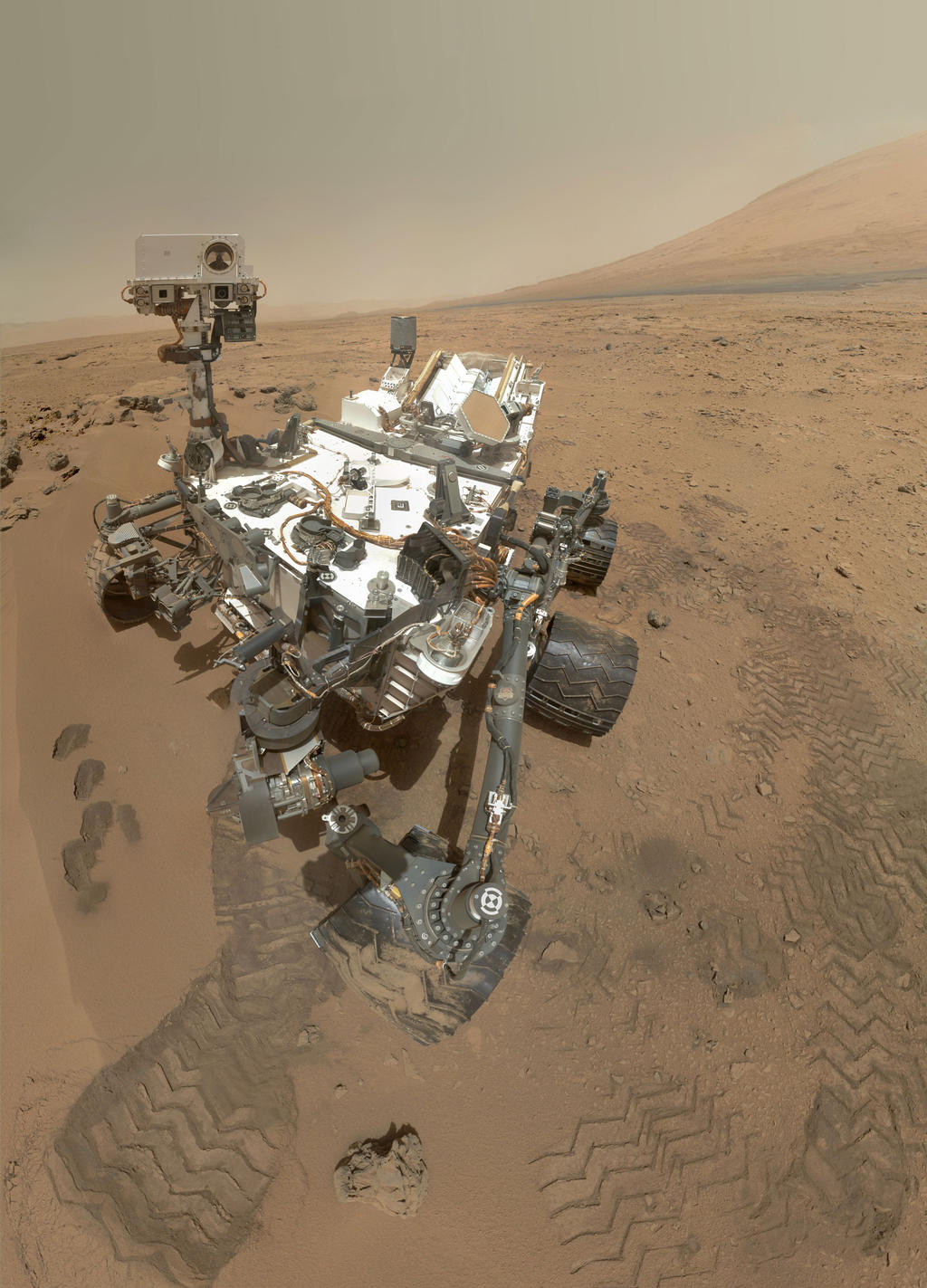
An Arms Length Self Portrait Captured Millions of Miles Away curiosityself
Facebook users here on Earth aren’t the only ones shooting arm’s-length self-portraits: NASA’s Curiosity rover over on Mars is doing it as well! Curiosity captured the image above a couple of days ago using its Mars Hand Lens Imager (MAHLI), which is attached to an extendable robotic arm. The image is actually a composite of 55 separate photos shot using the 2-megapixel RGB color CCD camera.

If you’re wondering why the arm itself isn’t seen extending into the photo — as is seen when we humans capture this type of shot — it’s because the arm can rotate out of the frame for each of the 55 smaller sections of the image, resulting in a stitched image that doesn’t show the arm at all.
NASA writes,
The mosaic shows the rover at “Rocknest,” the spot in Gale Crater where the mission’s first scoop sampling took place. Four scoop scars can be seen in the regolith in front of the rover.
The base of Gale Crater’s 3-mile-high (5-kilometer) sedimentary mountain, Mount Sharp, rises on the right side of the frame. Mountains in the background to the left are the northern wall of Gale Crater. The Martian landscape appears inverted within the round, reflective ChemCam instrument at the top of the rover’s mast.
The space agency says that this type of self-portrait allows the scientists here on Earth to track the condition of the rover over time, since the MAHLI camera is the only one of the 17 cameras that can see certain parts of the craft.
You can find a higher-resolution version of the photo here.
(via NASA via DPReview)

Image credit: Photograph by NASA/JPL-Caltech/Malin Space Science Systems

Read more at http://www.petapixel.com/2012/11/02/a-self-portrait-shot-millions-of-miles-away/#U8hJT4Bhgejw5xi5.99 

Tuesday, October 30, 2012

Photog Archiving 100 Images for Billions of Years by Sending Them to Space


Of all the images that have ever been made, would you be able to select just 100 to represent our species and human achievement? Trevor Paglen’s Last Pictures is a project to do not only that, but also launch those images into geosynchronous orbit around Earth – all so that long after humans are gone, any space-wanderer will be able to fathom what humanity was all about.
The project is based on the idea that after billions of years, all signs of human civilization will have eroded away on Earth, but its satellites will still spin around the planet, making them the best bet for an indefinite time capsule.
“Any group of people would come up with 100 totally different images, but that is part of the fun. It’s an impossible project. Part of it was to engage peoples’ imaginations,” says artist Trevor Paglen, who conceived of the concept and collaborated with scientists, anthropologists, curators and corporations to get the images into space.
Writer and artist, Anya Ventura, coordinated the work of five researchers who whittled down the image selection from 10,000 to 500 to 100. With every choice open to debate, it was a mindful experience.
“We’re inundated with images, but we don’t stop to look at them,” says Ventura. ”The Last Picturesnecessitates the act of looking. It’s a project that sticks with me because of our discussions about what makes a good photograph. We were tackling issues of representation and decoding images.”
But choosing the images was only the beginning – two more giant problems loomed. Firstly, how does one fabricate those 100 images to survive billions of years in space? Secondly, how does one get them into orbit?
Brian Wardle, associate professor at MIT’s Department of Aeronautics and Astronautics and director of the Nano-Engineered Composite aerospace Structures (NECST) Consortium consulted on design and fabricated the vessel for the images. He and Professor Karl Berggren, a quantum nano-structures expert, were mostly concerned with preventing diffusion – the incredibly slow movement of molecules which over millions of years could potentially degrade the sharpness of the image.
“By using a single material, Silicon, and etching physical features in that material, the Artifact will maximally resist diffusion. Usually the ‘sands of time’ erase writings through erosion, but in this case we used sand/Silicon against time to resist its effect,” says Wardle with a poetic flourish.
To that end, the Last Pictures are nano-etched onto a silicon disc – referred to within the project as “the Artifact” – and secured within a gold-plated aluminum clamshell.
Paglen now knew the images could survive, but how to get them up there?
Creative Time, a stalwart New York arts organization, and Last Pictures partner was on board to help with the logistics, but even when the project manger telephoned every company that put hardware into space they drew a blank.
“The cold-call approach didn’t work,” says Paglen.
Short on options, Anne Pasternak, Executive Director of Creative Time, began making pleas to audience members at her numerous public speaking events for contacts within the satellite industry. Two connections and a few phone calls later, Last Pictures had an agreement with EchoStar Corporation, a Colorado-based telecommunications company responsible for maintaining Dish Network’s satellite fleet. (EchoStar also owns SlingBox.)
Once the deal was done, Paglen waited for a window. It came in December 2011 when Palo Alto-based Space Systems Loral were in the final stages of manufacturing the next EchoStar satellite.
“Echostar gave us a month to get the disc tested and flight ready,” says Paglen. ”Many engineers stepped up over the Christmas holidays.”
After two delayed launch attempts, the 6,600 kilograms EchoStar XVI is set for launch on November 20th, from the Baikonur Cosmodrome in Kazakhstan, on the back of an ILS Proton Breeze M Rocket. EchoStar’s main cargo is 32 Ku-band transponders which will deliver direct-broadcast satellite (DBS) signals back to earth for suped-up local HD channels among other things.
Last Pictures‘ efforts have reminded many of  Carl Sagan’s Voyager Golden Record which included 116 images of animals, food, architecture, portraits and daily human life, as well as sounds. Ventura says the Last Pictures team were a bit sniffy about the appropriateness of Sagan’s images to farily represent unified humanity but when they took on a similar selection process, “we realized how difficult it was,” says Ventura.
“At the beginning we imagined the images as an archive, but later we started to think of them as a silent film, like poetry. We made aesthetic decisions,” says Paglen who in the book arranges many images in pairs based on formal relationships. ”I guess that’s where my artistic influence came in.”
Paglen and his team deliberately included images to challenge viewers.
“We’re making cave paintings for the future,” he says. “A lot of images are enigmatic. There’s stories outside of the images. Enough to keep the aliens on their toes!”
One curve ball is an installation shot of Malevich’s work at the Last Futurist Exhibition in St Petersburg, 1915. It is Paglen’s nod to the convergence of art, philosophy and science and to the definitive differences between the American and the Russian space programs.
“The U.S. space program has mythologies attached to pioneering and conquering, but the Russian tradition is very different,” says Paglen. “In the Russian tradition, the ultimate goal of humanity was to resurrect all humans. In the late 19th century Russian Cosmists such as Nikolai Fyodorov believed we need to go to space to collect all the particles of all the people who had ever lived. Cosmism says going into space is going into the past.”
The majority of the images, which are published in the Last Pictures book, carry layers of narrative. Percival Lowell’s 19th century maps of “canals” on Mars surface are typical of the tension between reality and perception. Lowell wasn’t out to fool anyone but the conflagration of tiny aperture and a eye condition he wasn’t aware of had him seeing things.
“He thought he was mapping canals on Mars, but he was really seeing blemishes in his own eye,” says Anya Ventura.
No one on the team is pompous about the selection. Rather Last Pictures is an interstellar version of the question, “If your house was burning down, which photos would you save?” It’s about questions, not necessarily answers.
“It’s a paradoxical project. It is about time and space, but also ambivalent,” says Paglen. “Last Picturesquestions material circumstances. What does it mean that we make machines that exist as long as the sun?”
For those who are uncurious about the answers to these questions, fear not. Ultimately the project taxed only a relatively small amount of resources.
“The Artifact hitched a ride on a satellite that was going up anyway, and the delta in payload was absolutely negligible relative to typical mass budgets and this one specifically,” says Brian Wardle of MIT.
The host satellite will only broadcast signal and orbit Earth for 15 years. Scheduled for 2027, the mission profile of Echostar XVI includes an end-of-life maneuver into a spacecraft junkyard just beyond the Clarke Belt.
“Creative projects are rarely the result of a single person’s efforts,” says Paglen. ”Technologically, it is not hard to launch an object into space. Emotionally, it has been difficult.”


Here’s a selection of the photographs chosen by Paglen:
Photog Archiving 100 Images for Billions of Years by Sending Them to Space Disc 01
Photog Archiving 100 Images for Billions of Years by Sending Them to Space Disc 02
Photog Archiving 100 Images for Billions of Years by Sending Them to Space Disc 03
Photog Archiving 100 Images for Billions of Years by Sending Them to Space Disc 04
Photog Archiving 100 Images for Billions of Years by Sending Them to Space Disc 05
Photog Archiving 100 Images for Billions of Years by Sending Them to Space Disc 06
Photog Archiving 100 Images for Billions of Years by Sending Them to Space Disc 07
Photog Archiving 100 Images for Billions of Years by Sending Them to Space Disc 08
In addition to being sent to space, the photographs have also been published as a new photobook titled “The Last Pictures.” Here’s the description:
The Last Pictures [...] is rooted in the premise that these communications satellites will ultimately become the cultural and material ruins of the late 20th and early 21st centuries, far outlasting anything else humans have created. Inspired in part by ancient cave paintings, nuclear waste warning signs, and Carl Sagan’s Golden Records of the 1970s, artist/geographer Trevor Paglen has developed a collection of one hundred images that will be etched onto an ultra-archival, golden silicon disc. The disc, commissioned by Creative Time, will then be sent into orbit onboard the Echostar XVI satellite [...] as both a time capsule and a message to the future.


Read more at http://www.petapixel.com/2012/10/30/photog-archiving-100-images-for-billions-of-years-by-sending-them-to-space/#zlghoEl6Bftaybm8.99 

Thursday, October 11, 2012

Camera-Equipped Copter Beams FPV to Goggles for Beautiful Aerial Imagery


We’re getting to the point at which photographers can buy fancy aerial drones without having to sell a kidney. You’ve probably already seen photos and videos shot from camera-equipped radio-controlled helicopters before, but did you know that the camera’s view can be beamed to a pair of goggles, allowing the photographer to be immersed in a first-person-view of what he or she is shooting? Read more at http://www.petapixel.com/2012/10/10/camera-equipped-copter-beams-fpv-to-goggles-for-beautiful-aerial-imagery/#fhshDf6UBPWd8Zg9.99 Here’s a beautiful video in which Esben Nielsen shows off this kind of rig through various shoots this past summer in Bornholm, Denmark: Read more at http://www.petapixel.com/2012/10/10/camera-equipped-copter-beams-fpv-to-goggles-for-beautiful-aerial-imagery/#fhshDf6UBPWd8Zg9.99


If you have semi-deep pockets and would like to use one of this copters for your own FPV aerial photography, check out Quadrocopter‘s Cinestar multi-rotor helicopters (used by NASA, Google, National Geographic, and the BBC). The cheapest DIY kit costs around $3,200. Read more at http://www.petapixel.com/2012/10/10/camera-equipped-copter-beams-fpv-to-goggles-for-beautiful-aerial-imagery/#fhshDf6UBPWd8Zg9.99


Monday, October 8, 2012

Taking photos of clouds earns Texas man a visit from the FBI


If you’re corresponding with known terrorists and attempting to overthrow the US government, it’s safe to expect a knock on your door from the FBI. But what if you just happen to think that storm clouds look really, really cool? Michael Galindo, 26, learned the hard way that anything and everything is seemingly fair game for an FBI investigation. He was taking photos of a dark and stormy rain cloud above his native Texas town of Houston last month and had to pay the consequences for it when a federal agent appeared at his front door on Friday. Galindo answered honestly when FBI Agent David Pileggi showed up at his Houston household last week and asked him about some photos he took on September 13 near the former Lyondell Refinery. “He said I was spotted near the refinery but I couldn’t even remember doing that. I thought it had to be somebody else,” Galindo tells Photography is Not a Crime. “It wasn’t until he mentioned my camera that I made the connection.” Galindo says he never once stepped foot on the refinery’s property, but it was enough to raise suspicion nonetheless. Someone at the facility spotted him shooting photos and phoned in the police, who in turn rang up the FBI Joint Terrorism Task Force. According to Galindo, he was just “looking for a clear line of site” so he could snap a photo of storm clouds overheard, something he does regularly as a volunteer member of he National Weather Service’s Skywarn program, a coast-to-coast system that lets civilians submit breaking information about any storms stretching across the sky. The Skywarn website acknowledges that the program is run in conjunction with 122 local Weather Forecast Offices throughout the country, including many that offer free training classes to amateur meteorologists. Galindo tells Photography is Not a Crime that the entire incident with Agent Pileggi ended peacefully. “He told me, ‘you’re not a threat and you are doing a public service but just be careful next time,’” the man recalls. That isn’t to say, though, that he got off without a hassle: Galindo says the agent asked him questions off a three-page document that involved any history he may have had with the US military or traveling overseas. Now, Galindo says, he is left wondering if the FBI has since opened up a file on him. “The worst thing I’ve done is get speeding tickets, but I haven’t gotten one in three years,” he tells the website.